Duplicating a project lets you start a new site with the configuration of an existing one, without re-entering everything.
From “My projects”, click “New”, then under “Duplicate an existing project”, choose the source project.
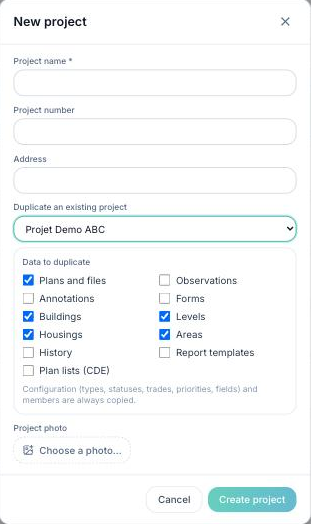
The configuration (types, statuses, trades, priorities, fields) and the project members are always carried over. You then choose which additional data to duplicate:
- Plans and files
- Observations
- Annotations
- Forms
- Buildings, levels, areas, housings
- History
- Report templates
- Plan lists (CDE)
Click “Create project”. Duplication starts: the source project's data arrives in the new project within a few moments, while the server copies it.
The source project is not changed.
