Plan statuses (approved, approved with comments, rejected…) are specific to each project. They are shown in colour in the CDE “Status” column.
1
Open “Menu” → “Settings” → “CDE & naming scheme”, “Plan statuses” section.
2
Click “Add a status”: a “New status” row appears.
3
Type the name, pick the colour by clicking the swatch, and enter a weight. Changes are saved as soon as you leave the field.
4
Drag the statuses by the handle to sort them, from least favourable (top) to most favourable (bottom).
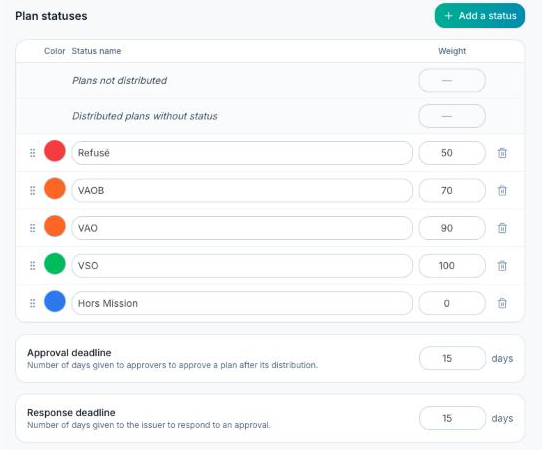
Order matters: when a plan has several approvers, its status in the table is the one of the least favourable approver, i.e. the status highest in this list.
The first two rows, “Plans not distributed” and “Distributed plans without status”, are fixed: only their weight can be changed.
Giving a plan a status
- Project without approvers: click the “Status” cell of a plan in the CDE and pick the status.
- Project with approvers: each approver gives its status, from the plan panel (“Approvers” section) or by clicking the “Status” cell; the plan status is computed automatically.
To delete a status, click its trash icon.
