The CDE (Common Data Environment) lists your plans in a table, one row per plan. Each plan is identified by its naming convention: FunBIM reads the name of the imported file, splits it according to the project's naming convention and creates the matching row automatically.
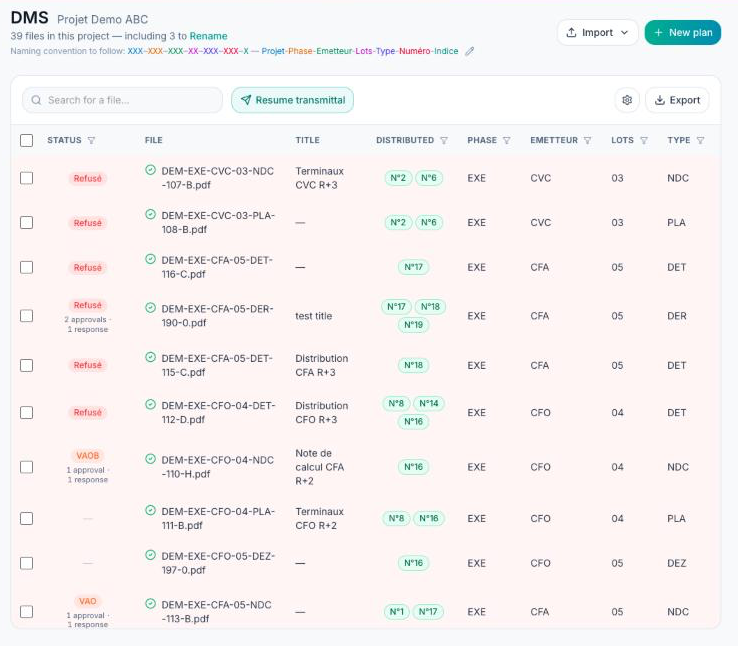
Open the project, then “GED” in the left-hand menu (the page is titled “CDE”).
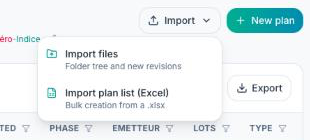
Click “Import”, then “Import files”.
In the “Import files” window, choose the destination folder on the left (“Root” by default, or “New folder” to create one).
Drop your files or folders into the area on the right, or click “Files” to pick them from your computer.
Check the list, then click “Import”.
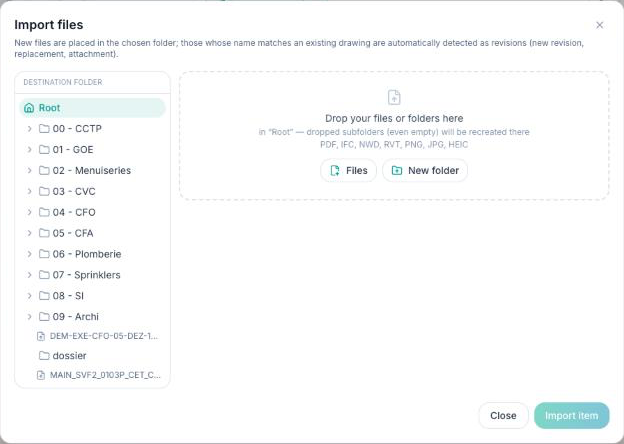
Accepted formats: PDF, IFC, NWD, RVT, PNG, JPG/JPEG and HEIC. Dropped subfolders are recreated as they are in the chosen folder.
What FunBIM does with each file
Before the import, each file gets a badge based on its name:
- new file: its name follows the naming convention and matches no plan, a new row is created in the table;
- “New revision”: the name matches an existing plan with a different revision, the file becomes that plan's new revision;
- “Replacement”: same plan, same revision, the file replaces the previous one;
- “Attachment”: the plan exists but has no file yet (for example a plan created by an Excel import), the file is attached to it;
- “This name already exists”: a file has exactly this name, it is not imported unless you click “Import anyway”.
Text placed after the naming code becomes the plan title: “DEM-EXE-MEN-02-PLA-105-A - Ground floor.pdf” gets the title “Ground floor”.
Files outside the naming convention
A file whose name does not follow the naming convention is imported, but no plan is created. The “including N to Rename” counter appears under the page title: click “Rename” to fix their names (FunBIM shows live whether the naming is valid) or “Ignore” them.
The “Import” and “New plan” buttons only appear once the project's naming convention is set up (see “How do I set up the CDE?”), and only for members allowed to import files. “New plan” creates a row without a file, by typing the naming code by hand.
