Approvers are the trades that review distributed plans: client, project manager, architect, inspection body… Each approver gives its own status to each plan.
Open “Menu” → “Settings” → “CDE & naming scheme”, “Plan approvers” section.
Click “Add an approver”, then pick an existing trade from the list, or “Create a new approver trade”.
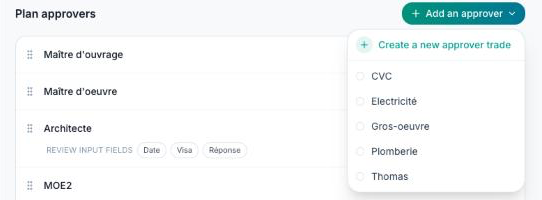
Drag the approvers by the handle on the left to set their order: it is the order of the approval columns in the CDE and in transmittals.
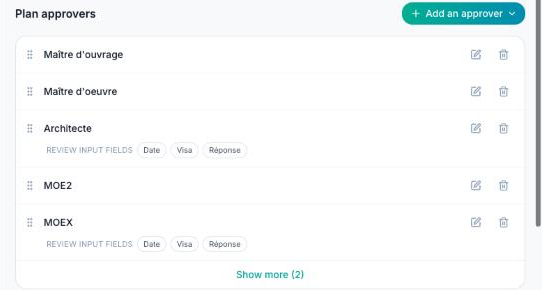
Review input fields
Click an approver's pencil to open its trade. The “Is a plan approver?” box is ticked; “Add an input field” adds the fields this approver fills in on each reviewed plan (date, approval, reply…).
You can also turn a trade into an approver from the “Stakeholders” tab, by ticking “Is a plan approver?” in its form.
Reviewing a plan
In the CDE, click a plan row to open its panel: the “Approvers” section lists the approvers, each with its status. Expand an approver to fill in its input fields, write its review (with a PDF attached if needed) and the issuer's reply.
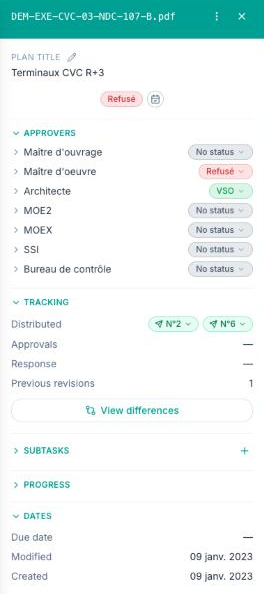
The status shown in the table's “Status” column is the least favourable of the statuses given by the approvers.
To remove an approver, click its trash icon, then “Remove from approvers”: the trade is kept, it simply no longer reviews plans.
