The CDE table is set per user: your settings follow you on all your devices and change nothing for the other project members.
Choosing and ordering columns
1
In the CDE, click the gear icon to the left of “Export” (“Configure columns”).
2
In the “Columns” panel, click a column's eye icon to show or hide it.
3
Drag a column by its handle to change its position.
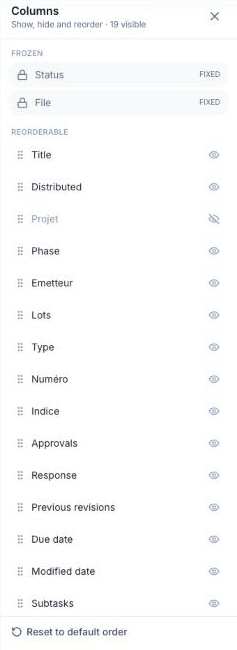
The “Status” and “File” columns are frozen at the start of the table. “Reset to default order”, at the bottom of the panel, restores the original order.
Available columns: Title, Distributed, one column per naming segment, Approvals, Response, Previous revisions, Due date, Modified date, Subtasks, plus Approval delay, Response delay and Total delay when approval deadlines are set.
Filtering and sorting
- Click the funnel of a header (Status, Distributed, each segment, Approvals, Response, Previous revisions) to keep only some values.
- Click a column name to sort: once ascending, twice descending, three times to go back to the default order.
- The “Search for a file…” field filters on the file name.
Filters and sorting are not saved: they are reset when you leave the page. When approval deadlines are set, the default order puts late plans first.
