An observation can be created from the plan (it is then positioned by a pin) or from the “Observations” list.
On the plan: open it from “Files”, click “Observations” in the floating toolbar, choose the type, then click where you want on the plan. The creation form opens, already located.
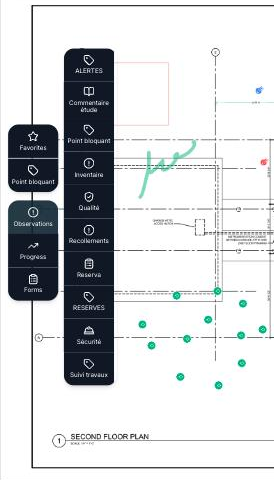
From the list: “Observations” menu, “Observation” button, then choose the type. You can locate it later with “Locate on the plan”.
The creation form offers:
- A title and a description — which can be dictated with the microphone on a tablet.
- The status, priority and due date.
- The trades concerned and, if needed, the people assigned.
- The location: building, level, area, housing unit.
- Photos: taken on the spot on a tablet, or dragged from the computer, and can be annotated before sending.
- The type's custom fields.
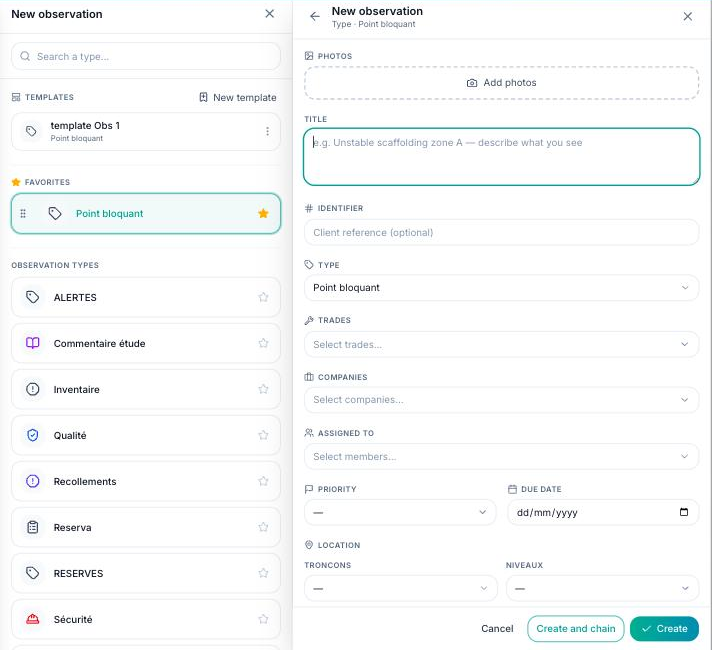
“Create” saves the observation; “Create and chain” immediately opens a new one of the same type, handy during a site visit. The observation gets an automatic number and appears in the list, on the plan and in the project's activity feed.
