A FunBIM report is generated from a report type: a reusable template that sets the layout, filters and options. Open the project's “Reports” menu.
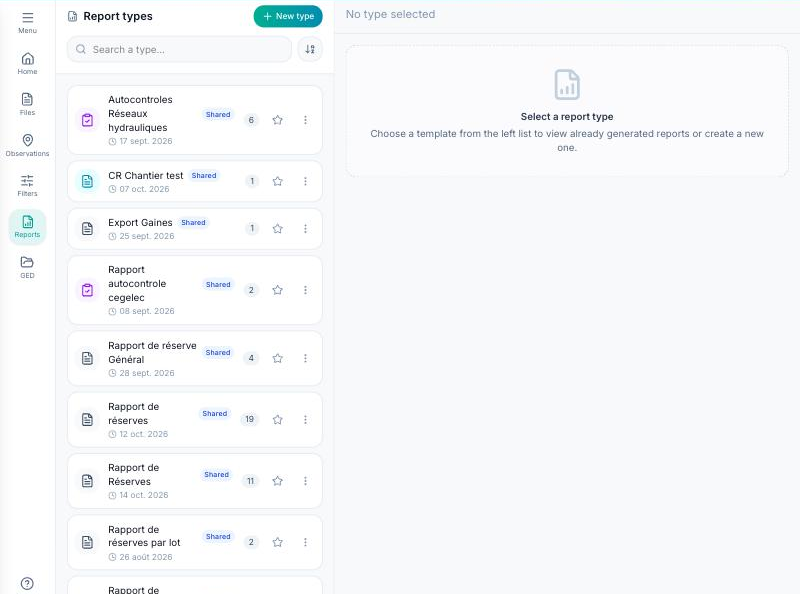
Click “New type”: a panel opens on the right with the following sections.
- Identity: the name of the report.
- Template: Standard, Classic no. 2, Site meeting minutes or Site meeting minutes (modern), with a “Preview” on demo data.
- Visibility: Personal (visible to you only) or Shared (the whole project team).
- Logo: the logo printed on the cover and in the header.
- Filters: statuses, types, trades, priorities, buildings, levels, areas, units, plans; then “Number of reports” (a single one, or one per trade) and “Sort items by”.
- Period: since the start of the project, this week, this month, custom…
- Options: include comments, include forms (hybrid mode), attach filled forms as an appendix, export forms only, export without plans, and the fields to print for each item.
- Format: orientation, page size, language and number of signatures.
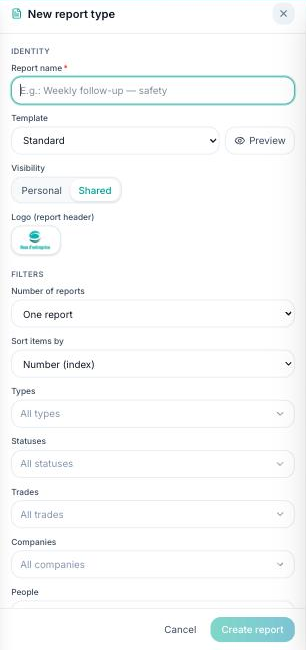
“Create report” saves the type. From its card, “Generate” produces the PDF in a few seconds, with the plans and the observation pins. It appears in the list of generated reports, where you can open, download or delete it. The star on the card adds the type to your favourites.
Site meeting minutes ask, before generation, for the meeting number, the attendees and the order of observations by trade.
